
Master Of Pottery Workshop Controls
Mouse wheel on the wheel, left and right click in the kiln, and how the Deck stays Playable.
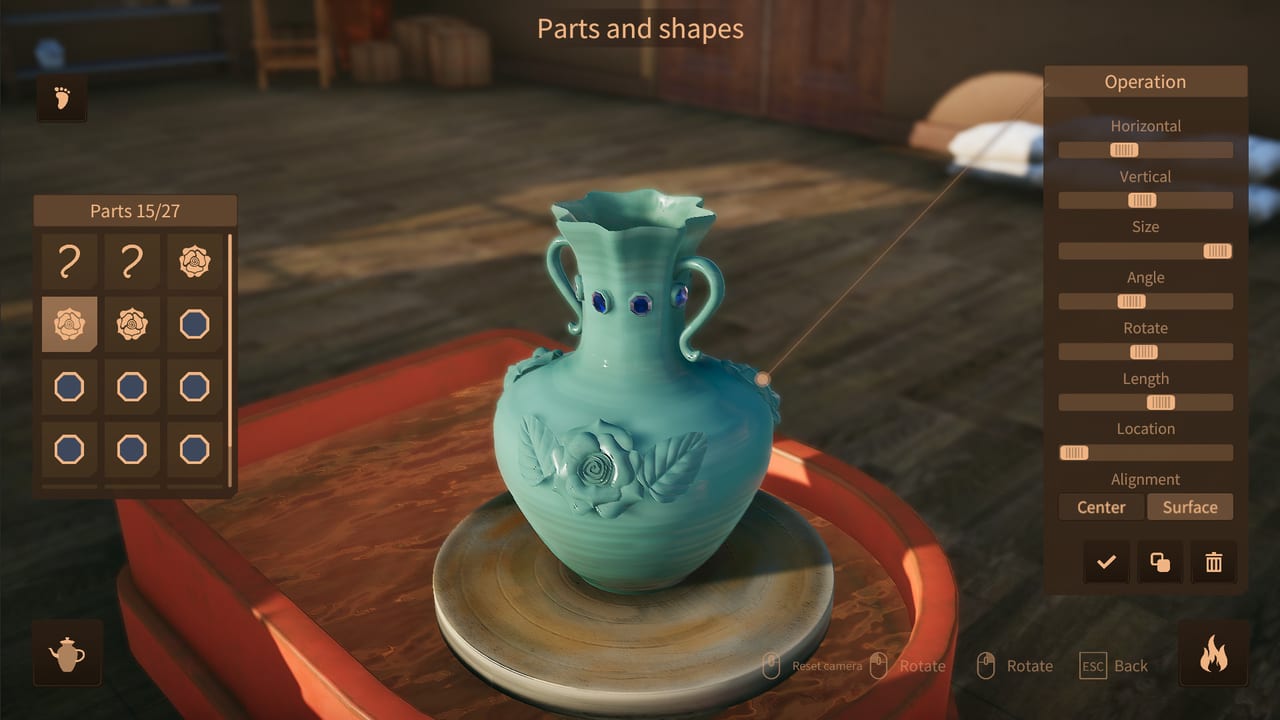
Master Of Pottery is built around a mouse. The wheel, the kiln, and the paint table all read clicks and drags more than a WASD loop. AZGames shipped 1.0 on 10 September 2026 for Windows, with Steam Deck listed as Playable. That Playable tag is honest: the game runs, and you can finish exhibitions on a handheld, but throwing and firing still prefer a precise pointer. This page is the input map. Pair it with Getting Started if you have not finished Mason’s first work, and with the Throwing Clay Guide once the lump is on the wheel.
Steam lists Multi-player, and 1.0 added public and private rooms that pay online tokens. Those rooms use the same menus as the rest of the UI. The studio itself stays a one-player wheel; two people do not throw the same lump on one PC.
Throwing: wheel, drag, and bulge buttons
On the potter’s wheel, the mouse wheel is the stroke. Roll to work the clay vertically. Click and drag to push a wall in or out. The tutorial text asks you to make the clay even and symmetrical; that is a smoothness bar at the bottom of the screen, not a hidden grade. If the profile looks lumpy, left-click and ride up and down the wall until the meter settles. Tall vases want more upward passes. Wide bowls want outward pulls near the rim.
Bulge-shape buttons sit beside the wheel. Each one adds a preset swell, waist, or ridge. You can stack them, then still sculpt by hand. Undo and redo exist; use them instead of restarting a 50-inspiration pot. Copy and rotate tools appear once you start adding parts. They duplicate a handle or a decorative bulge around the form so you are not placing eight identical lugs by eye.
Handles, lids, and spouts are not free on day one. They unlock in the store as you level. The Throwing Clay Guide covers the 50-part cap and why extra parts feed SSS rank. From a controls view, parts are place-and-nudge objects: select, drag to the wall, rotate, confirm. Camera orbit (usually click-drag off the clay, or a dedicated rotate control on the throwing HUD) is how you see the far side of a spout. Orbit often. A handle that looks centered from the front can clip the rim in profile.
Kiln: left heat, right cool
The first fire is a timing minigame in three bands: drying, preheating, high temperature. Left click adds heat. Right click cools. The first band comes up fast, which is why new players overshoot. Click in short bursts, not one long mash. The Kiln Firing Guide explains the inside-out burn and why a miss only prints after the piece comes out. Controls-wise, treat it like a temperature needle, not a progress bar you fill to 100.
The second fire after glaze has no minigame. You start it and wait. Do not hunt for extra clicks there; they are not part of the rank formula.
Some older forum posts mention tapping R while heating. Player tests did not show a reliable rank change from that. Stick to left and right mouse. If you later train apprentices, a high-star graduate can run the kiln for you from a list accessed while shaping. That is a menu choice, not a new hotkey.
Painting, glaze, and camera
On the paint table, strokes are mouse drags. Density or strength is a slider. Color picks from purchased pigments. Glaze is a separate pass; many players open glaze first because the recipe (zinc ash is a common pick) does more for quality than a tidy line. The Painting Glaze Guide covers stroke count, custom image import, and DLC patterns. Controls here are orbit plus brush. Rotate the pot, paint a band, rotate again. Custom images are file picks from a button, not a drag off the desktop.
Camera orbit is the same idea in every studio room: keep a clear view of the surface you are editing. In the exhibition hall you click booths to place work, then use UI buttons for ticket price and the Publicity tab (TV icon) for ads. Those are cursor menus. Keyboard shortcuts are sparse; if a prompt appears, follow it, but do not expect a full rebind screen.
Steam Deck and controller caveats
Steam marks the game Playable on Deck, not Verified. Community reports include docked play with a mouse, and handheld play with trackpad-as-mouse. That is the safe path. Throwing strokes and kiln burst-clicks are miserable on a plain analog stick. If you use a controller layout, bind a trackpad or gyro to the pointer, and put left/right click on triggers. Touchscreen can move menus. It is a poor throwing tool.
Docked to a monitor with a USB mouse, the Deck behaves like a small Windows box. That is the closest to the intended feel. Handheld sessions are fine for exhibitions, mail, store shopping, and placing booths. Save the kiln band for a pointer you trust. Check system requirements for the Windows baseline if a handheld build stutters in the hall.
Menus you will actually click
Lower right: map, Next: Exhibition Day, and context buttons such as Drink in the Tea House. Mailbox: orders and apprentice requests. Information tab: total visitors, works, sold works, income. Publicity tab: newspaper and later ads. Decoration tab: walls, floors, benches bought with raw material. None of these need a gamepad overlay if you have a cursor.
If an order is active, accept it before you throw so required logos show up in the pattern list while you decorate. That is a UI order-of-operations issue, not a hidden key.
Learn the pointer well and the rest of the wiki is mechanics. Fire next, or go back to the Pottery Guides Hub if you only needed this page as a legend. A clean left-click in the kiln is worth more than a new bind you will forget on exhibition day.
Frequently Asked Questions
Quick answers about throwing, firing, and running your showroom.
How do I throw clay with the mouse?
Use the mouse wheel for vertical strokes and click-drag to push walls in or out. Watch the smoothness bar, then use bulge-shape buttons for preset waists and ridges.
How do I control the kiln?
On the first fire, left click heats and right click cools through drying, preheating, and high temperature. The second fire after glaze has no timing minigame.
Does Master Of Pottery work on Steam Deck?
Steam lists it as Playable. A mouse or trackpad pointer is strongly preferred for throwing and kiln clicks. Analog-stick-only layouts fight the minigame.
Can two people throw on one PC?
The studio is one player at the wheel. Steam Multi-player and 1.0 public or private rooms are for online tokens and visiting, not a shared lump of clay.
Where do I orbit the camera?
Use the throwing and painting rotate controls to see the far side of handles, spouts, and painted bands. Orbit before you confirm a part.