
Master Of Pottery Import Your Own Images
Jpg and png from the in-game picker, not Qianlong stickers, and SSS still wants clay and fire.
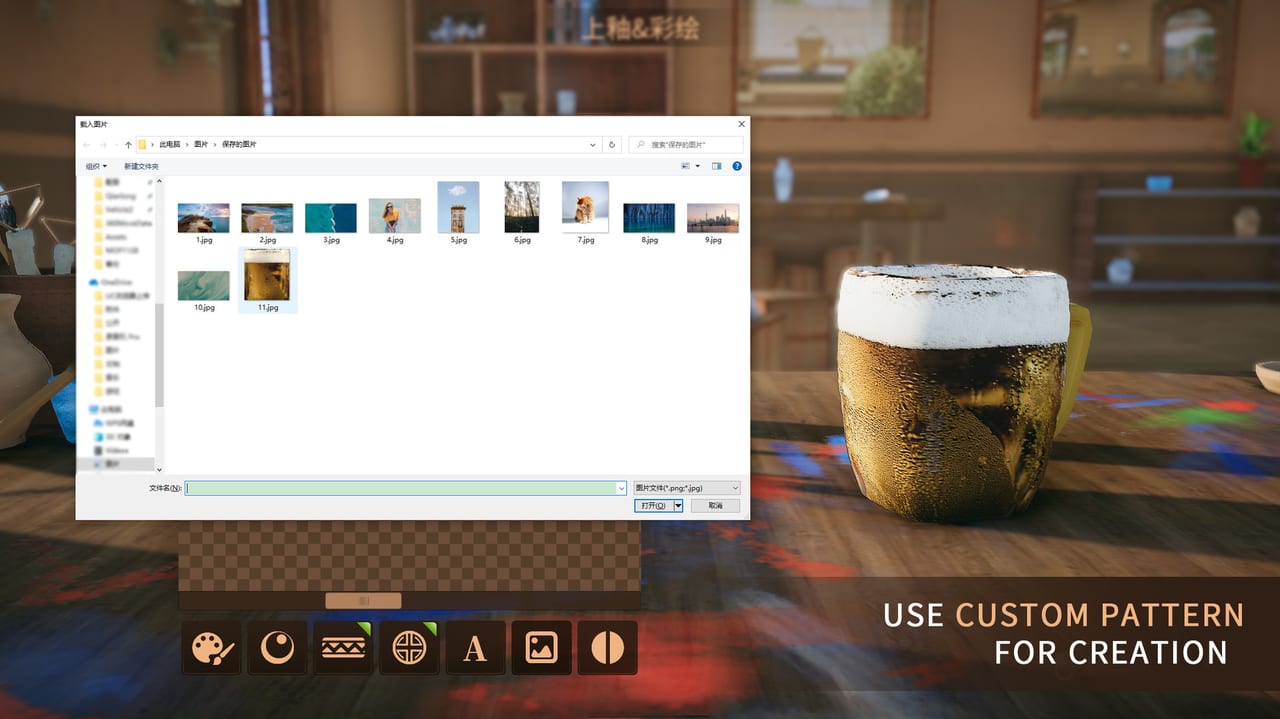
Custom pattern is the Master Of Pottery tool that wraps your own picture onto a vessel. The Steam page calls it Unique: rich tools and materials, and you can use the custom pattern, which can use your own image for painting. Version 1.0, released 10 September 2026, still ships that import in the base game. It is not a DLC pack. It is not a workshop subscription. It is a file you pick from disk while you are already on the paint bench.
This page is the import, the file types the in-game picker actually likes, how a photo differs from Qianlong, Medieval, Persian, and Cartoon packs, and why SSS still wants expensive clay and a clean kiln after the wrap. Pair it with the Painting Glaze Guide for glaze-first order of operations, the DLC pattern packs list for paid motif families, the SSS Rank Guide for the scoring stack, and the Export Collection Guide if the one-of-one pot is worth sharing.
The video on this page is a session of making real objects into pottery. Use it as a look at wrapping everyday images. Then come back here for the file rules the picker enforces.
Open the in-game picker
Custom import lives on the decoration table, in the pattern tools, after you have some workshop progress. Official store copy from the Chinese listing notes that player-defined patterns unlock once experience in the studio is high enough. You do not install a mod. You do not drop files into the game folder first. You throw, fire the bisque, glaze if you are working in the right order, then open paint and look for the custom slot in the pattern categories.
The picker is an ordinary file dialog. Point it at an image on your PC. The formats that belong here are jpg and png. Those are the files the dialog is built to load. A PSD, a WebP, a TIFF, or a layered Illustrator export is the wrong homework. Convert first. Flatten. Save a jpg or a png. Then pick that file from inside the game, not from a desktop shortcut you hope the wheel will notice.
Place the wrap on the form the same way you place a stamp. Orbit the pot. Cover the far side. Handles, lids, and spouts need attention too, or the photo stops at the seam and the add-on reads as a blank. Density still matters for surrounding paint strokes. The import is one layer of the surface, not a replacement for the hour of brush work the scorer likes.
Jpg, png, and a usable picture
Jpg is fine for photographs. Png is finer for logos, crests, and graphics with hard edges. Either works if the picker accepts it. What fails in practice is a huge print file, a tiny thumbnail, or a busy collage that turns to mud on a curved belly. Crop before you import. Push contrast if the subject is a face or a product. A low-contrast snapshot wrapped on a teapot becomes a brown smear under exhibition lighting.
You do not need a 4K texture. You need a clear subject that still reads after the clay curves. Square-ish crops wrap more predictably than ultra-wide banners. If the image has a white background and you wanted a floating crest, edit the background out in any simple editor and save png. The game is not a Photoshop replacement. It is a wrap.
Keep a folder of studio-ready files so you are not hunting Downloads during a 100-inspiration day. Name them. A file called final2-copy.jpg is how people stamp the wrong joke on a show urn. The picker shows what the OS shows. It does not rate your art.
Not a DLC pack
Qianlong, Medieval, Persian, and Cartoon are paid motif libraries. They install into the material list with fifty-plus authored patterns each. Suzhou Garden is a scene and an extra wheel, not a sticker sheet. Those packs carry the late-pattern weight the scoring pass expects from expensive, late unlocks. Details and prices live on the DLC page.
A custom jpg does not become a Qianlong decal because you wrapped it on porcelain. It is your art on whatever clay you paid for. That is the whole difference. Packs help style tags when an order or a hall theme wants imperial, medieval, Persian, or cartoon energy. Custom helps when you want a photograph, a club crest, a product, or a joke no pack contains. You can use both on one career. You should not mix five families on one pot if you still care about a clean style tag.
Packs are optional. Custom import is in the base game once the paint slot is open. You can 100% the twelve Steam achievements without buying DLC and without importing a single photo. Import because you want a one-of-one, not because you think the scorer is an image-recognition AI. It is not. It cannot tell whether your crane is elegant. It can tell glaze tier, pattern tier, stroke volume, parts, kiln, and whether the set matches.
SSS still wants clay and fire
Players wrap a holiday snapshot on tutorial clay, miss the first-fire bands, and then ask why the letter is C. Custom pattern does not skip the stack. Late expensive clay is still the loudest material lever. Zinc ash and other late glazes still sit under the wrap. Throwing strokes and paint strokes still count. Parts still cap at 50. The kiln still burns inside-out, and mistakes still show after the first fire. Style and color still have to agree.
Read the SSS Rank Guide before you spend white clay on a photo mug. Glaze first, as the Painting Glaze Guide argues. Then wrap. Then add real brush work around the image so the surface is not a sticker on a naked body. Then fire the quiet second kiln. If the bisque already cracked, stop. Do not pour a treasured png onto a burnt core.
A raw photo on a cheap glaze is a novelty. A raw photo on zinc ash with a worked throw is a show piece. Pottery master still wants ten SSS works. None of those ten are granted because the wrap was a portrait. Rooms and online tokens from 1.0 do not grade the image either. Steam Multi-player does not replace the kiln.
When the wrap is the point
Use custom pattern when the hall needs a conversation piece: a real teapot copied into clay, a mascot, a map, a gift. The exhibition heat meter does not care that the picture came from your camera. Visitors in 1.0 talk in real time; a recognizable image can draw comments and, later, a buy letter. That is hall income, not a rank cheat.
Do not use a custom wrap to fake a required order logo. Tea House jobs want the Tea House mark in the second pattern category after you accept. A png of a teacup is not that mark. Finish the brief with the stamped logo, then make the photo pot on a different lump.
If the piece is worth keeping after the hall cools, export it. The Export Collection Guide is the file path: Export This Work, copy the .pottery out of Works, paste into Collection, or send the file to another player. The wrap travels inside that file. You do not mail them your jpg separately unless you also want them to stamp it on a new throw of their own.
A jpg on a cheap bisque is a sticker. A png on zinc ash with a long throw is a signature. Import from the in-game picker, keep the file ordinary, and do not expect Qianlong weight from a holiday snapshot. If the piece is worth keeping, export it. If it is an SSS attempt, buy the clay first. Custom pattern is a paint slot, not a rank skip, and the kiln still has the last word after the wrap.
Frequently Asked Questions
Quick answers about throwing, firing, and running your showroom.
What file types can I import?
Use jpg or png from the in-game file picker on the paint bench. Convert PSD, WebP, or other editor formats first. The dialog loads an ordinary image from disk.
Is custom pattern the same as DLC?
No. Qianlong, Medieval, Persian, and Cartoon are paid motif libraries with late-pattern score weight. Custom import is your own image in the base game. See the DLC page.
Will a custom image make SSS by itself?
No. SSS still wants late clay and glaze, throwing and paint strokes, parts, a clean first fire, and style match. A photo on tutorial clay is a novelty mug.
Where do I pick the image?
On the decoration table, in the pattern tools, after the custom slot has unlocked with workshop progress. Pick the file from inside the game. Do not only drop it into the install folder.
Can I share a pot that uses my image?
Yes. Export the finished work and pass the .pottery file. The wrap travels with the piece. Steps are on the Export Collection Guide.